White-label ride-hailing platform

One platform.
Every brand.
Configured per tenant.

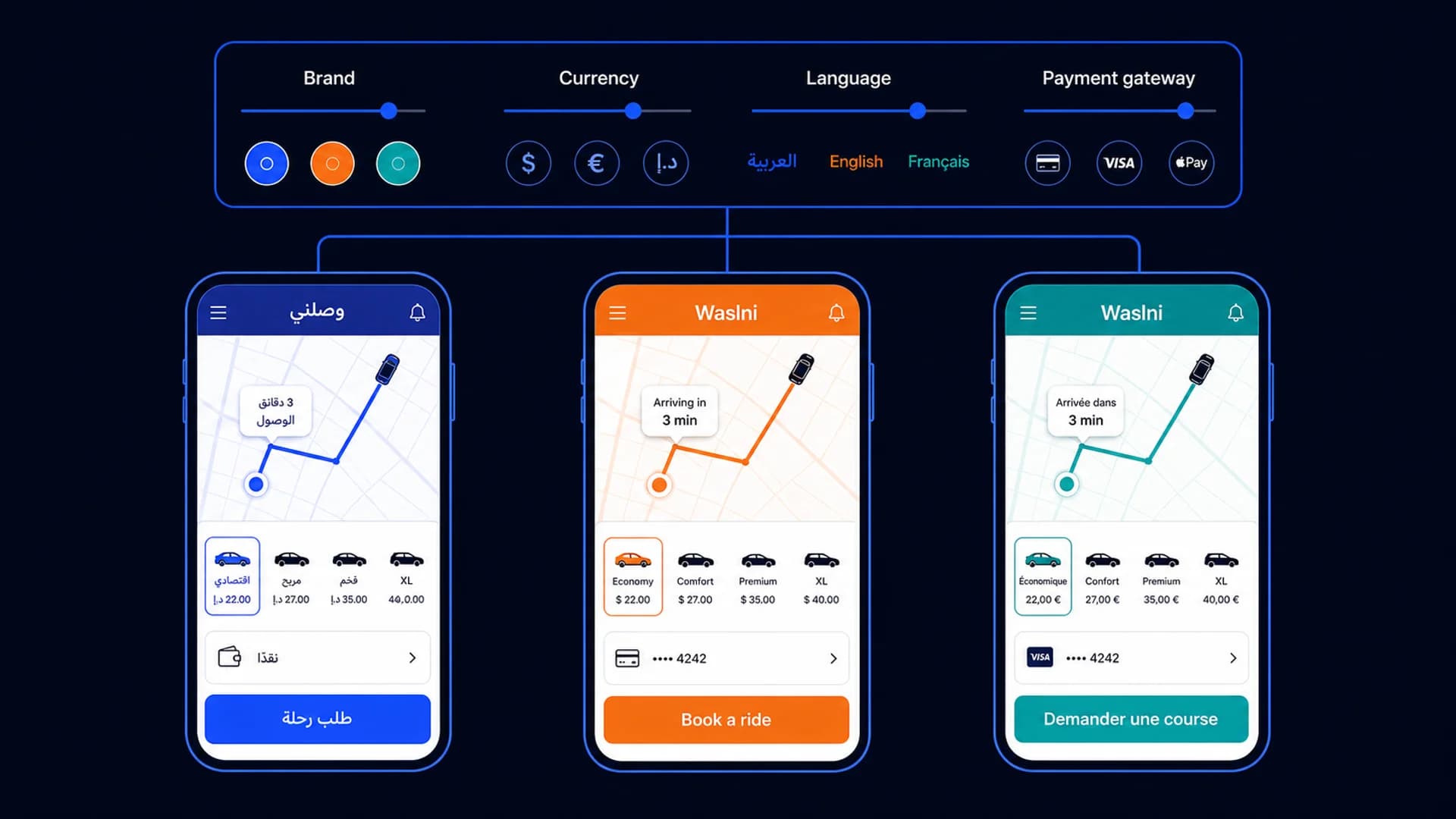
Waslni combines an Arabic-first mobile experience, 8 bundled interface languages with tenant-visible languages controlled by configuration, tenant settings, implemented regional payment providers, and a launch plan scoped to the market.

Three phones running the same ride-hailing app in different brands and languages
1
Shared product with tenant-specific configuration
8 bundled
Interface languages; tenant-visible languages depend on configuration
Role-aware
One app for riders, drivers, shops, and authorized staff
Scoped
Launch plan based on market dependencies
By Waslni Editorial TeamPublished · Last updated · 10 min readWhite-label platform

White-label is one of the most abused words in B2B software. It usually means a re-skin — same product, different colour, same vendor name buried in the footer of a receipt PDF.

A ride-hailing product must support far more than a visual re-skin: live driver workflows, pricing, money records, support, permissions, incidents, releases, and local operating responsibilities. The exact included capabilities still need to be demonstrated and written into the deployment scope.

Waslni is built around two product decisions. First, operators use a maintained hosted platform rather than maintaining a separate fork of the codebase. Second, tenant configuration reaches into service types, fares, peak hours, document requirements, registration fields, permissions, policy content, and App Experience so routine operating changes stay under the operator’s control.
Four pillars

What 'white-label'
actually means
when you ship it

Most platforms claim white-label and ship a re-skin. These are the four lines that separate a real white-label platform from one.

01

It is genuinely your brand

Logo, palette, app name, bundle ID, deep-link host, splash colour, push sound, store metadata, marketing email templates — all per-tenant variables. Two Waslni-powered apps will not look like siblings unless their operators want them to.

02

Admins change product behaviour, not engineers

Service types, fares, peak windows, driver document checklist, registration form fields, role permissions, banners, terms of service, OTP providers — all editable from the dashboard. Engineering ships product, not config tickets.

03

Arabic is a first-class language

The customer and driver experiences support right-to-left Arabic alongside seven other bundled languages. Tenant-authored labels and content can be managed by language from the dashboard.

04

Regional payments are configurable

The provider catalog includes Lahza for Palestine and Fawry, Kashier, and Paymob for Egypt. Operators enable the methods available in their country and choose whether each method serves customers, drivers, or both. Cash and wallets are supported too.

What the platform includes

A complete
ride-hailing stack

One connected product stack: a unified mobile app, a quick in-app admin area, and a full web control panel, all backed by the same tenant configuration.

Mobile

One app for riders and drivers

Customers request rides, browse shops, order delivery, use their wallet, and review history. Approved drivers switch the same account into driver mode for jobs, navigation, earnings, wallet, and document workflows. One install replaces separate rider and driver apps.

In-app admin

Quick operations from the phone

Permission-aware admins can search users, review drivers, follow orders and withdrawals, manage shops and coupons, send notifications, and open the live command center without leaving the mobile app.

Web admin

Full dispatch + configuration

The browser dashboard adds live dispatch, analytics, service and pricing editors, App Experience controls, driver-registration forms, payment methods, roles, content, marketplace layout, and audit history.

Platform features

What is in the box

These are areas of the current Waslni product to inspect in a configured demo. Availability and integrations depend on the tenant, country, release, and signed scope.

Multi-tenant

Run one brand or many

Tenant context selects the correct database, Redis namespace, and operating configuration. In multi-tenant mode, authenticated tokens also carry a tenant claim that must match the tenant resolved for the request.

Permissions

Real role-based access

Super Admin, Admin, Manager, Customer Service out of the box, each with a granular permission registry. Build custom roles by toggling permissions. Audit log captures who changed what.

i18n

8 bundled interface languages, configured per tenant

The mobile bundle contains English, Arabic, Russian, Turkish, German, French, Ukrainian, and Hebrew resources. Each tenant exposes only configured languages—normally English and Arabic, with Hebrew additionally configured for the Palestine deployment.

Compliance

Driver identity and document workflows

Compose driver-registration sections and required fields by service type, including identity, licence, vehicle, insurance, image, text, select, year, colour, and vehicle-model inputs. The mobile flow follows the saved configuration.

Onboarding

Self-serve driver registration

Drivers register from the app, upload documents, and your team reviews from the admin panel. The form is admin-composable: add new fields by type (image, text, select, color, car model) without shipping code.

Releases

OTA updates where technically eligible

JavaScript-only changes can use Expo EAS Update. Changes that add or modify native code still require a new binary and store review.

Buy vs. build

Generic SaaS vs.
Waslni

Use this table as a requirements prompt, not a claim about every competing SaaS product. Ask each vendor to complete it from current evidence.

Feature
Generic ride-hailing SaaS
Questions to verify with each vendor
Waslni
MENA-first, hosted, configurable
Hosting model and data location
Ask vendor and record region
Hosted; confirm deployment scope and location
Per-tenant config without code
Ask for a live edit
Service types, fares, docs, forms, roles, content
Arabic and RTL coverage
Test screen by screen
Test the configured app and admin journeys
Supported MENA payment integrations
Verify country and merchant flow
Configured per tenant from implemented providers
Tenant isolation
Request architecture and test evidence
Separate tenant context; request deployment evidence
White-label app-store ownership
Confirm contract and accounts
Planned through the operator’s developer accounts
Shared product update model
Varies by vendor
Single codebase; OTA where eligible
Launch planning
Varies by scope
Scoped around market dependencies
Launch timeline

Four stages.
One controlled launch.

The sequence is consistent, but the duration depends on brand assets, developer accounts, gateway approval, local licences, testing, and store review.

01 /
Step 1

Brand + tenant setup

Confirm the app identity, tenant configuration, currency, default language, domain, storage, and administration access.

02 /
Step 2

Operating configuration

Configure service types, fares, peak windows, driver registration, service areas, permissions, and App Experience.

03 /
Step 3

Payments + local requirements

Connect supported gateways through your merchant accounts and complete local licensing, privacy, and legal review.

04 /
Step 4

Controlled pilot + store submission

Test the configured flow with a controlled pilot, resolve findings, then submit the production binary through your developer accounts. Store approval remains outside the platform’s control.

Questions operators ask

Honest answers.
Not sales answers.

01 /

What does "white-label" mean on Waslni?

It means one mobile app is published in the App Store and Google Play under your developer accounts, with your name, logo, colours, and bundle ID. That app contains rider and driver modes and can also expose shop-owner and permission-aware admin tools. The full web dashboard sits on your operating domain.

02 /

Can I launch rides only, delivery only, or both?

Yes. Settings → App Experience includes Ride-only, Delivery-only, Ride-first, Delivery-first, and Both presets. You can enable Transport, Marketplace, and Wallet independently, choose the opening module, and localise the module labels.

03 /

How is this different from buying an Uber clone?

A clone script usually transfers the maintenance burden to the buyer. Waslni is hosted: the shared platform is maintained centrally, while each operator manages its own brand, configuration, data, and daily business.

04 /

Can I edit fares and service types without engineers?

Yes. The admin panel has dedicated editors for service types (car, taxi, van, motorcycle, custom), pricing formulas per service type and per city, peak-hour multipliers with multiple windows per day, and seat-count rules. Changes take effect immediately.

05 /

Which payment gateways are currently supported?

The platform integrates Lahza for Palestine and Fawry, Kashier, and Paymob for Egypt. Activation depends on the tenant’s merchant account and configuration. Any other gateway or country requires a separate technical and commercial review.

06 /

Do you support Arabic in the admin panel too?

Yes. Every admin screen is fully translated and rendered right-to-left when the operator picks Arabic. Email and SMS templates are bilingual. Print receipts render correctly in Arabic.

07 /

What about the source code? Do I own it?

Waslni is hosted SaaS, so the platform source code is not transferred. Your agreement should state the ownership and export terms for your data, brand assets, tenant configuration, accounts, and published app listings.

See it for yourself

A real demo tenant,
ready to explore

Request access to the unified app and web admin, then test your services, roles, language configuration, registration, pricing, and integration scope.

White-label ride-hailing platform — Waslni